
A party can feel relaxed to the guests because someone has already thought through the small decisions. These party planning templates help organize those decisions, from confirming a venue to checking replies, without turning a friendly gathering into a complicated project.
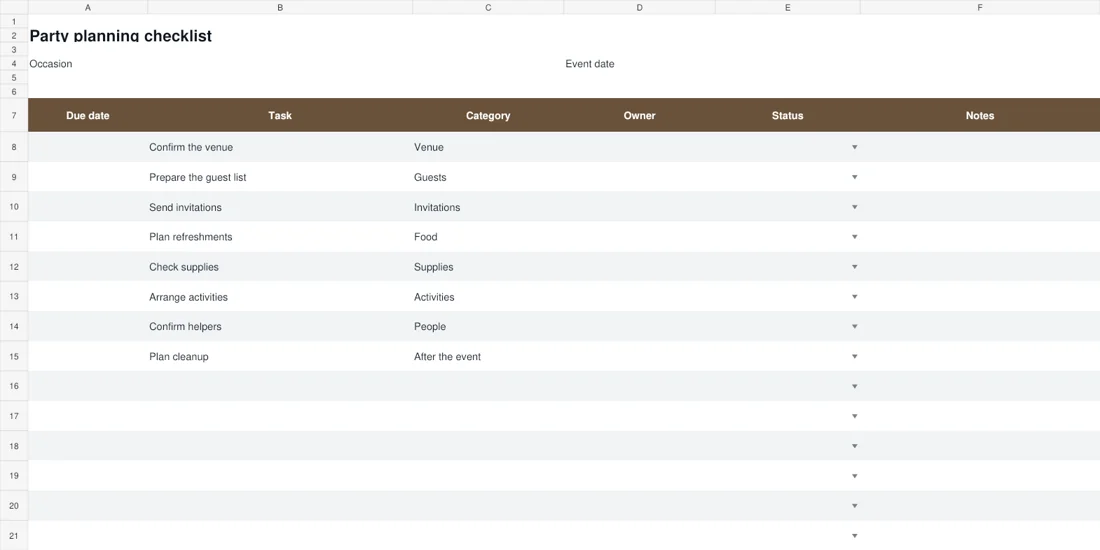
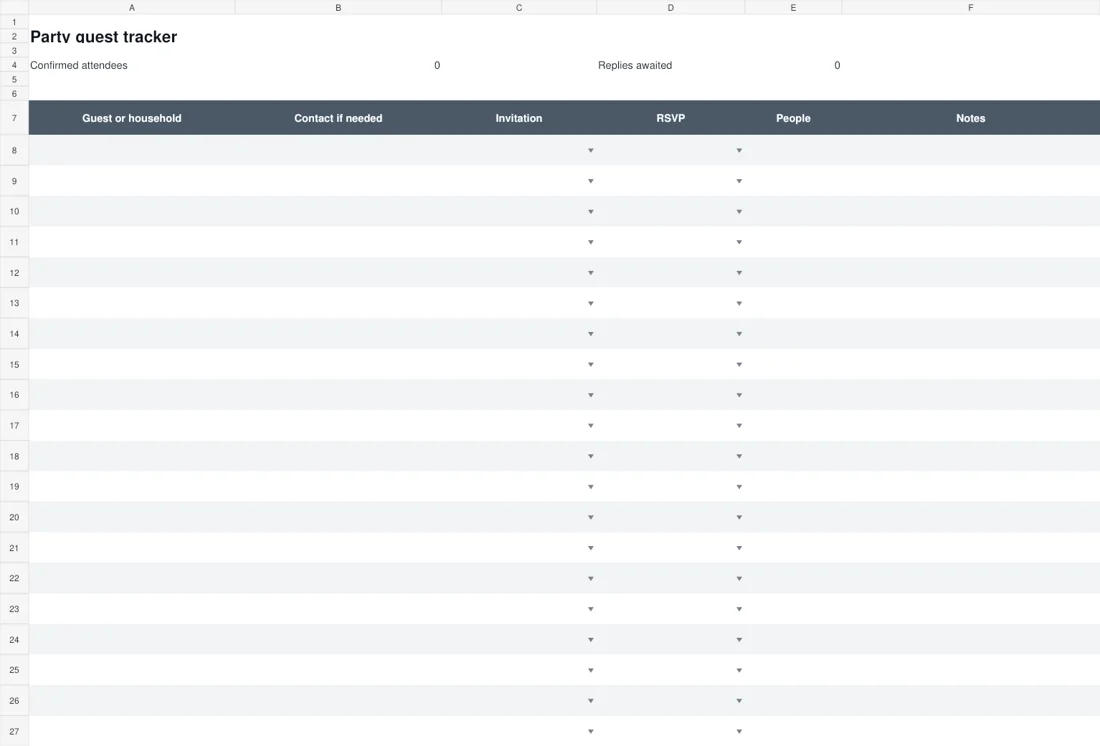
The party planning checklist is an editable Excel file with starter tasks, owners, due dates and status choices. The party guest tracker keeps invitations, RSVP responses and party sizes in a separate view, with simple totals for confirmed attendees and replies awaited.
Use the two downloads together when the guest count affects food, seating or supplies. They also work separately: a small gathering may need only a checklist, while a shared host may mainly need a current guest list. The files provide structure, and you decide which details are worth tracking for the occasion.
Set a few boundaries before choosing decorations
Start with the occasion, likely number of guests, venue and the resources you want to devote to the event. These decisions influence most of the later tasks, including timing, food and the type of activities that make sense.
You do not need a perfect plan before beginning, but it helps to know which decisions are settled and which remain tentative. Enter the occasion and event date in the checklist so the file is easy to identify later.
If several people are hosting, agree who can make which decisions and how shared expenses will be handled. The checklist does not calculate a budget, so keep detailed costs in a separate record if you need them.
A clear boundary at the start can prevent enthusiastic additions from overwhelming the original idea.
Turn the starter checklist into your own plan
The checklist includes common starting tasks such as confirming the venue, preparing the guest list, sending invitations, planning refreshments and arranging cleanup. These are prompts rather than a universal list.
Remove anything irrelevant and add the tasks particular to your gathering, such as checking an outdoor backup plan or arranging access to a community room.
Use a task description that tells someone what to do. “Supplies” is less useful than “check plates, cups and serving items against the confirmed guest count.” Assign an owner and a due date where appropriate.
The status choices help distinguish Planned, In progress, Complete and Needs review, but they work only if the hosts use them consistently and revisit unresolved tasks before the event.
Record guest groups without confusing the headcount
The guest tracker can use one row per person or one row per household or invitation group. Choose an approach and keep it consistent.
If one row represents a household of four, enter four in People when that is the confirmed party size; do not assume a row always equals one attendee. The Confirmed attendees total adds People only for rows whose RSVP is Attending.
Replies awaited counts rows marked Awaiting, so it measures outstanding responses rather than the number of possible people. A blank RSVP does not automatically count as awaiting. This distinction matters when planning reminders and supplies.
Use Notes for concise practical context, and avoid collecting personal details that you do not need for hosting the event.
2 downloadable templates and previews
These two downloads are editable files, with previews rendered from the actual documents. Choose the layout that fits your task, then use its download button to save the Word document or Excel workbook.
Keep a blank original and create a working copy before entering your own information. The preview shows the starting layout; longer text, additional rows and your local print settings may change how the edited file appears.
Check the finished document on screen and in print preview before sharing it. The two choices support different ways of organizing the topic, so you can use one independently or combine them where that is useful.
Party planning checklist
Download Party planning checklist
Party guest tracker
A household reply and a changing guest count
Suppose the guest list contains one row for a household invited as a group. The household confirms that two people will attend, so the host marks RSVP as Attending and enters 2 in People. The confirmed total increases by two, not by one row.
Another invitation remains marked Awaiting with an expected group size of three. That row adds one to Replies awaited, but none to the confirmed attendance total. Later, the second household confirms all three people.
Updating its RSVP to Attending brings the confirmed total to five and removes that outstanding response. This small example explains why the two totals answer different questions. Before ordering refreshments, the host reviews confirmed people; before sending reminders, they review outstanding replies.
The checklist then records the order task and its owner, linking the guest information to an actual planning decision without pretending the spreadsheet has made the decision itself.
Keep invitation status separate from RSVP status
Sending an invitation and receiving an answer are different events. The tracker provides Not sent and Sent choices for the invitation, alongside Awaiting, Attending, Declined and Maybe for the reply. Marking Sent does not automatically add the person to the confirmed count.
When someone answers, update the RSVP and party size as appropriate. If the answer is Maybe, decide when you will check again rather than quietly treating it as a confirmed place. For a household invitation, confirm whether the reply covers everyone listed.
This avoids a common mismatch between the number of invitations and the number of people expected. Keep one current guest record if hosts are sharing responsibility, so a reply received by one person is not missed by the person ordering refreshments.
Use the headcount as a planning input, not a promise
A confirmed guest count is more useful than a guess, but it can still change. Review the count before decisions that depend on it, such as seating, food or hired items.
Record the date of a major order in your checklist and consider whether the supplier or venue needs a final number by then.
The guest tracker does not decide quantities or account for every late change, so use your knowledge of the occasion and any supplier guidance.
If you need to discuss dietary or accessibility arrangements, use a considerate private contact route and record only the practical information necessary for the event. Avoid circulating a broad guest spreadsheet containing sensitive details simply because several people are helping with setup.
Plan the day and the work after the party
The visible celebration is only part of the plan. Confirm who can access the venue, when setup starts, who receives any deliveries and how cleanup will be handled. A short running order can sit alongside the checklist if the event has several timed activities.
For a simple gathering, a few clear notes may be enough. Leave realistic gaps for moving furniture, serving food and dealing with small delays.
Make sure the person responsible for a task knows they have been assigned it; a name in a spreadsheet is not a conversation. After the event, include returning borrowed items and settling shared costs where relevant.
Those small closing tasks are easier when they were considered before everyone leaves tired.
Customize and check the Excel files before sharing
Save blank originals and create working copies named for the occasion and date. Adjust column widths so long task descriptions and guest names remain readable.
If you add guest rows beyond the original twenty, extend the total formulas and validation ranges deliberately, then test the result with a small known example. New rows outside the current ranges will not automatically be included in every calculation.
The files do not send invitations, reminders or messages. Use your usual communication method and update the record afterward. Before sharing a copy, remove any sample entries and check that the recipient needs the contact information it contains.
A practical plan is one the hosts can read, maintain and use without having to interpret hidden assumptions.
Keep the plan proportionate to the gathering
A casual meal with a few friends does not need the same detail as a larger celebration in a hired venue. Keep the tasks that reduce uncertainty and remove the ones that merely create administration.
If the file becomes too much to maintain, agree a small set of essential updates: venue, invitations, guest count, food and cleanup. Shared hosts can review those items briefly rather than discussing every possible decoration.
Afterward, note what was useful and what was unnecessary before saving a clean master for another occasion. The aim is to make hosting easier and leave more attention for the people attending. A tidy spreadsheet is helpful only when it supports that purpose.
A final check before using the template
- Confirm the occasion, date and venue arrangements.
- Adapt starter tasks and assign real owners.
- Choose one guest-row convention and use it consistently.
- Keep invitation and RSVP status separate.
- Check confirmed people before count-dependent decisions.
- Plan cleanup, returns and the final shared updates.
Related templates
For a timed running order, use event itinerary templates.
For a simple activity or contribution list, see sign-up sheet templates.
For a separate photo keepsake after a celebration, explore wedding album templates.
Frequently asked questions
What do the party planning downloads include?
The collection includes an Excel planning checklist and a separate guest tracker. The checklist organizes tasks and owners; the guest file records invitations, responses and party sizes.
How is the confirmed guest count calculated?
The total adds the People values for rows marked Attending. It does not count every invitation or every row as one person. Keep household or group entries consistent with the number actually confirmed.
Why is Replies awaited different from the headcount?
Replies awaited counts rows whose RSVP is Awaiting. It measures outstanding responses, which may represent individuals or groups, while confirmed attendees sums people in attending rows.
Can I add more than twenty guest rows?
Yes, in a working copy. Extend the relevant formula and validation ranges as well as the visible table, then test the totals before relying on the expanded guest list.
You can also browse more options in the Samples category.
