
A new employee can receive a friendly welcome and still spend the afternoon wondering who approves a request or where to find a basic procedure. Employee orientation checklist templates help turn those small gaps into named tasks, clear contacts and follow-up conversations.
The two Word downloads cover different stages. The first week orientation checklist organizes preparation, day-one essentials and the first check-in. The role and department orientation record follows the work a newcomer needs to learn and the people who can help. Use either separately or combine them as part of your existing onboarding process.
These editable documents are starting points for a local plan. They do not contain every workplace requirement. Add the procedures, training and review steps that apply to the role, then assign owners so that orientation is a shared responsibility instead of a list handed to the new colleague.
A final check before using the template
- Confirm the first-day contact and practical arrangements.
- Assign each preparation task to a clear owner.
- Use current procedure references and support contacts.
- Add role-specific learning and applicable required training.
- Record open issues with next steps and dates.
- Hold a check-in before closing the orientation record.
Make the first day predictable
Before the employee arrives, confirm the practical details that can otherwise consume the morning: start time, location, arrival contact and any arrangements for remote access. Check that the manager knows who is meeting the newcomer and that essential equipment has an owner.
A task marked complete should describe something that actually happened, not merely an email someone intended to send. For a remote employee, replace a building tour with a walkthrough of communication channels, shared files and the support route for access problems.
Avoid putting passwords into the checklist. The document should point to the approved way of obtaining access, while credentials stay in the appropriate system. A modest amount of preparation helps the welcome feel considered rather than improvised.
Separate essential information from the full reference library
A first-day orientation checklist should make the day easier to navigate. It does not need to become a complete employee handbook.
Identify the few things the newcomer must understand immediately: who to contact, how to ask for help, what the first tasks are and where essential workplace guidance lives.
Link or refer to the current source for detailed procedures rather than copying long passages into a file that may become outdated. Then schedule the remaining topics across the first week or month.
People can acknowledge that a resource was shared without yet being confident in applying it. Make room for questions and practice. Orientation works better when the manager checks understanding through a useful task or conversation rather than measuring only how many documents were distributed.
A practical first-week sequence
Consider a small service team welcoming a coordinator on Monday. On Friday, the manager confirms the arrival contact and asks IT to prepare access. On Monday morning, a colleague explains the team’s routine and shows where current job information is stored.
The manager then agrees two manageable priorities for the week. Tuesday’s department session covers a recurring report, with a named guide and time for the newcomer to try the process.
By Thursday, one access request remains open, so the checklist records the contact and expected next update rather than marking the task complete. Friday’s check-in focuses on that issue and the questions raised during the first report.
The completed sheet is useful because it records what remains to be done. It does not pretend that a friendly tour means the person has learned every part of the role. The following week’s plan can build from those actual observations.
2 downloadable templates and previews
These two downloads are editable files, with previews rendered from the actual documents. Choose the layout that fits your task, then use its download button to save the Word document or Excel workbook.
Keep a blank original and create a working copy before entering your own information. The preview shows the starting layout; longer text, additional rows and your local print settings may change how the edited file appears.
Check the finished document on screen and in print preview before sharing it. The two choices support different ways of organizing the topic, so you can use one independently or combine them where that is useful.
First week orientation checklist
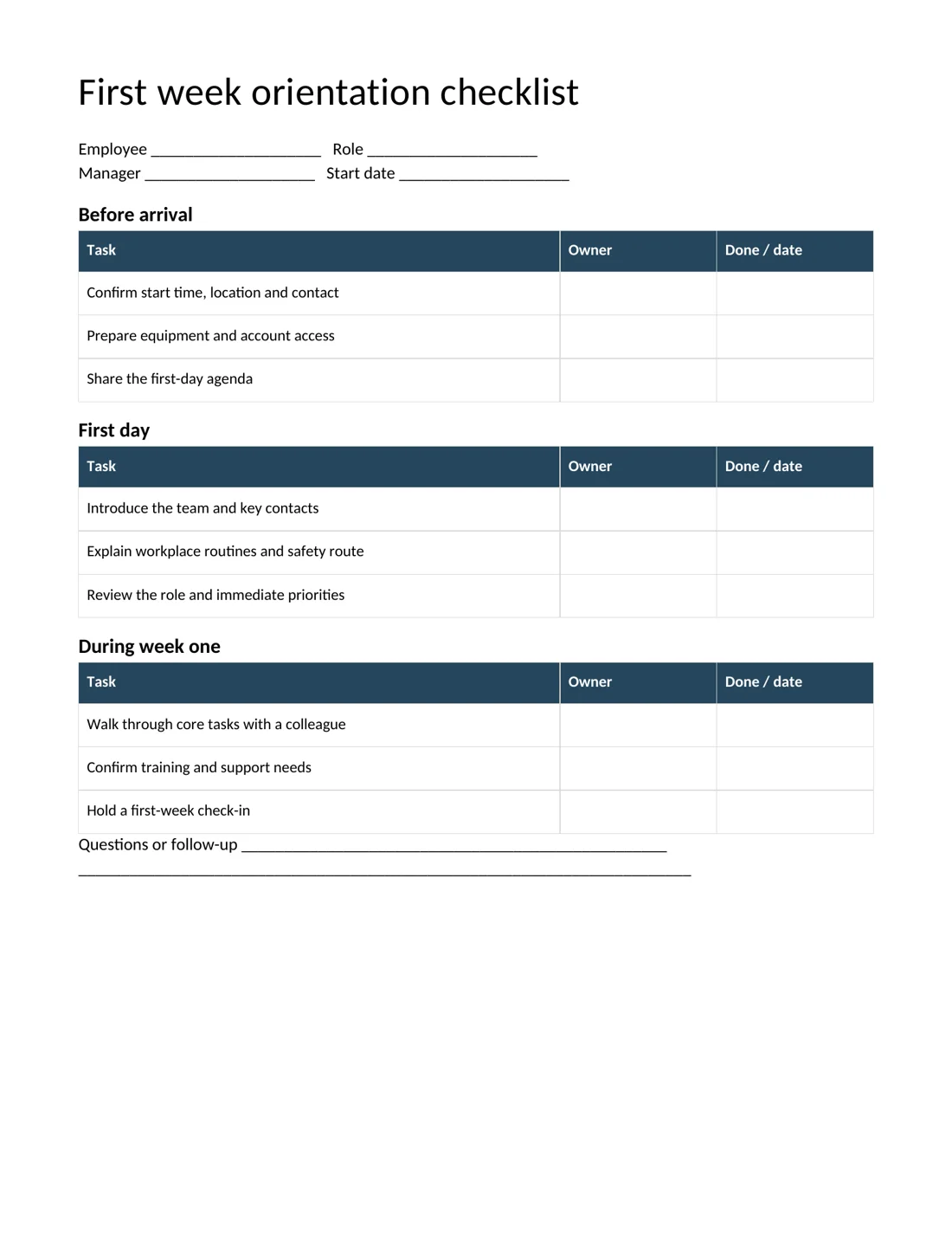
Download First week orientation checklist
Role and department orientation record
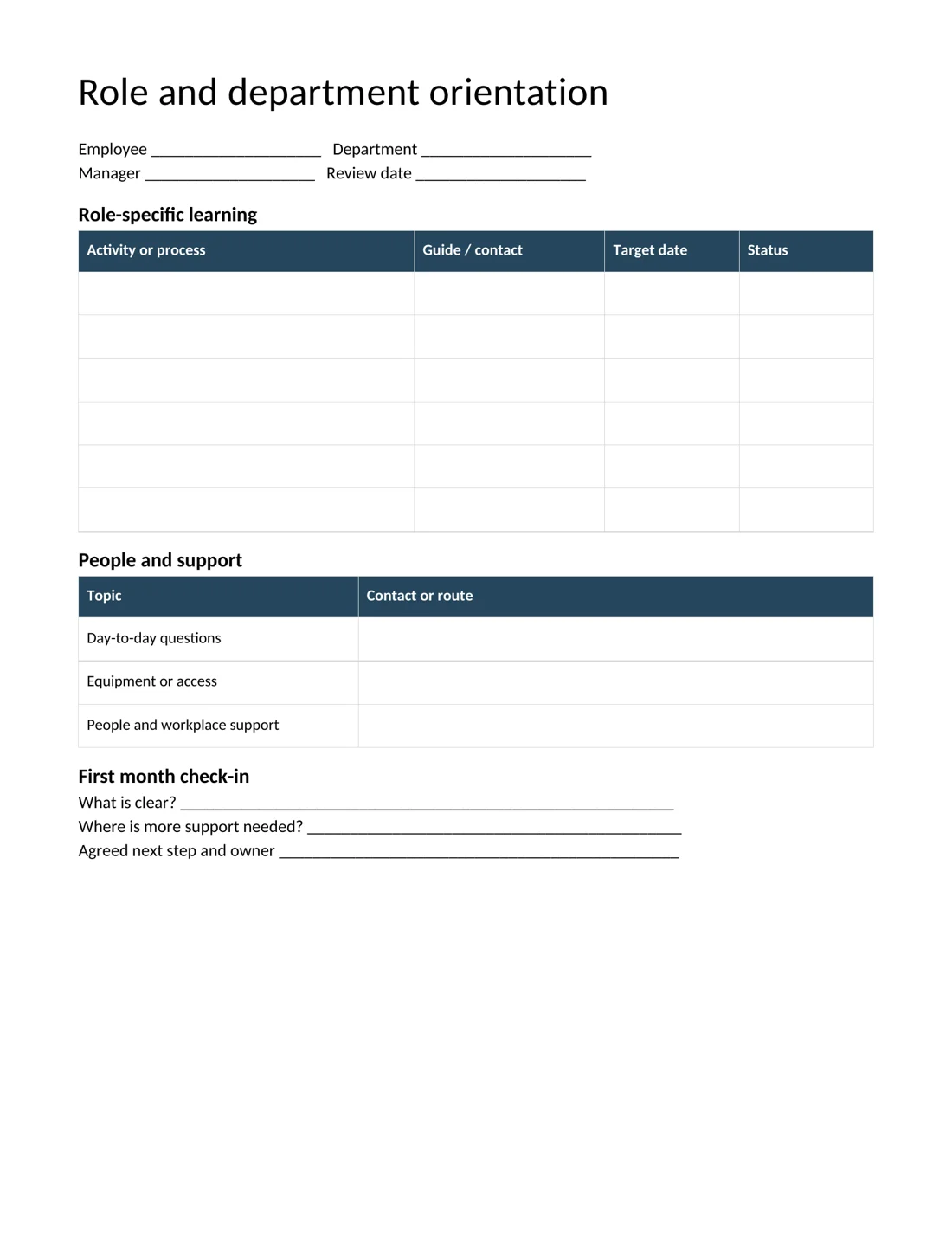
Download Role and department orientation record
Give each checklist item a real owner
Use the Owner column for a named person or an unmistakable role. A task assigned to everyone often ends up belonging to nobody.
Equipment preparation may belong to an IT contact, while role priorities belong to the manager and everyday routines may be explained by a buddy. Keep those responsibilities visible so the newcomer does not have to coordinate their own welcome.
Record a completion date or a short status in the final column, and use the follow-up space for anything unresolved. If a task depends on another team, record the next contact and expected response. This makes the checklist a coordination tool.
It also helps a substitute manager continue the plan if the original owner is unexpectedly unavailable during the first week.
Use the department record to teach actual work
The role and department orientation record is designed for the next layer of learning. Replace generic activities with the processes the person will actually use, such as preparing a recurring report, handling a customer query or finding an approved template.
Name the colleague who will demonstrate each process and agree a realistic target date. A useful activity often includes three stages: observe, try with support and complete independently where appropriate.
You can record those stages in Status rather than treating the first demonstration as the end of training. Add the location of the current procedure in a note if needed.
Keep the record focused on the role, because a long list of unrelated department tasks can make progress harder to see and priorities less clear.
Plan conversations, not just information delivery
A short first-week check-in can uncover issues that a completed checklist misses. Ask what feels clear, what still requires help and which part of the work is different from what the employee expected. Keep the questions concrete enough to answer.
Instead of asking whether everything is fine, ask whether the person can find the information needed for tomorrow’s task. Agree one next step, an owner and a time to return to it. The department template includes a first-month review area for this purpose.
Avoid turning an orientation record into an informal performance judgment without explaining its purpose. The immediate aim is to confirm access, understanding and support so the new colleague has a fair opportunity to begin the work.
Adapt the checklist for different working arrangements
A hybrid employee may need both a physical workspace introduction and a clear account of how the team works when people are elsewhere. A shift worker may need a handover contact, roster explanation and a plan for meeting colleagues on another shift.
A returning employee may need updates to changed systems rather than the entire introduction repeated. Use the templates as a structure, then remove irrelevant rows and add the missing tasks. Keep the language direct: explain the action and the person who will help.
If role-specific safety or other required training applies, include its proper owner and reference. The checklist can record completion, but it should not replace the actual training or the organization’s formal evidence requirements.
Keep personal information and versions under control
An orientation record usually needs the employee’s name, role, start date and relevant work contacts. It rarely needs sensitive personal details. Use the approved HR process for information that belongs elsewhere, and avoid collecting it again simply because a blank space is available.
Save the file where the people responsible for onboarding can access the current copy. Include a version or review date if the blank template will be reused. Before another employee starts, check that contacts, procedures and links are still current.
A checklist that points to a departed colleague can create more confusion than an empty field. Preserve the completed record according to your organization’s usual practice, and keep the reusable master separate from individual employee files.
A better handover to the manager
Before the first month ends, review the orientation record with the employee and the people who provided support. Look for repeated questions that suggest the process itself needs improvement. Perhaps every newcomer struggles to find the same procedure or waits for the same access request.
Update the blank master so the next orientation starts with that lesson. Keep individual feedback specific and fair, and agree which learning activities should continue beyond the introductory period.
If another manager takes over, the record should explain current priorities and outstanding support without requiring a reconstruction from several email threads.
The best handover is a short, accurate account of what has been covered, what is still being learned and who owns the next step.
Related templates
For continuity when responsibilities change, use handover templates.
Keep employment confirmation separate with employment certificate templates.
If your organization issues staff identification, see ID card templates.
Frequently asked questions
What should an employee orientation checklist cover?
Include arrival arrangements, equipment and access, key contacts, workplace routines, role priorities and follow-up. Add the training and procedures that apply to the actual workplace rather than relying on a generic list alone.
Can I edit these onboarding checklists in Word?
Yes. Both downloads are editable DOCX files. Replace the prompts, add or remove rows, and save a blank master separately from each employee’s completed orientation record.
How long should orientation take?
The first day covers immediate essentials, while role learning often continues through the first week and beyond. Choose a sequence that reflects the work and use check-ins to identify what needs more support.
Should the employee complete every item alone?
No. The manager and supporting teams should own the tasks they control. The employee can contribute questions and confirm understanding, while named colleagues handle access, introductions and role guidance.
You can also browse more options in the Templates category.
