
A financial goal can look sensible on paper and still be difficult to follow through. The useful question is often smaller: what changed since the last review, and what needs attention next? These financial progress tracker templates give you a place to record that movement without turning a simple habit into a complicated accounting project.
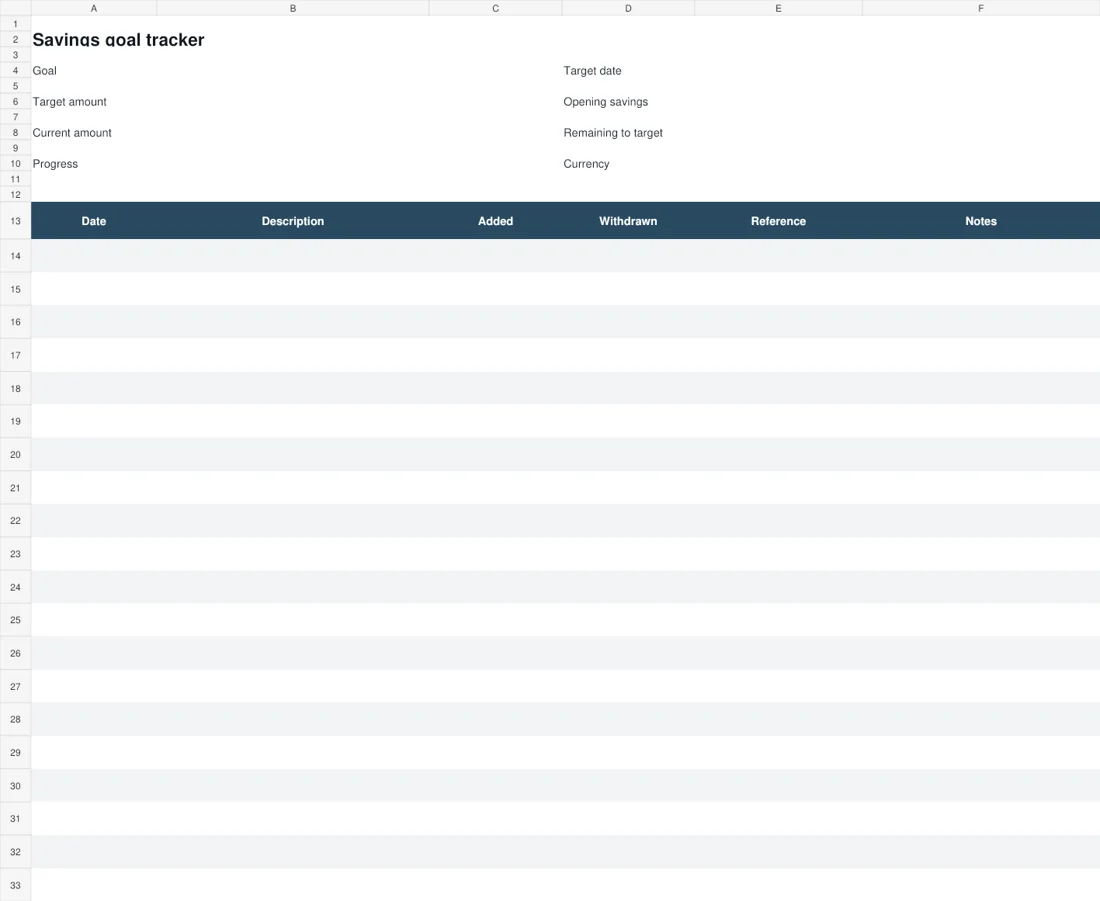
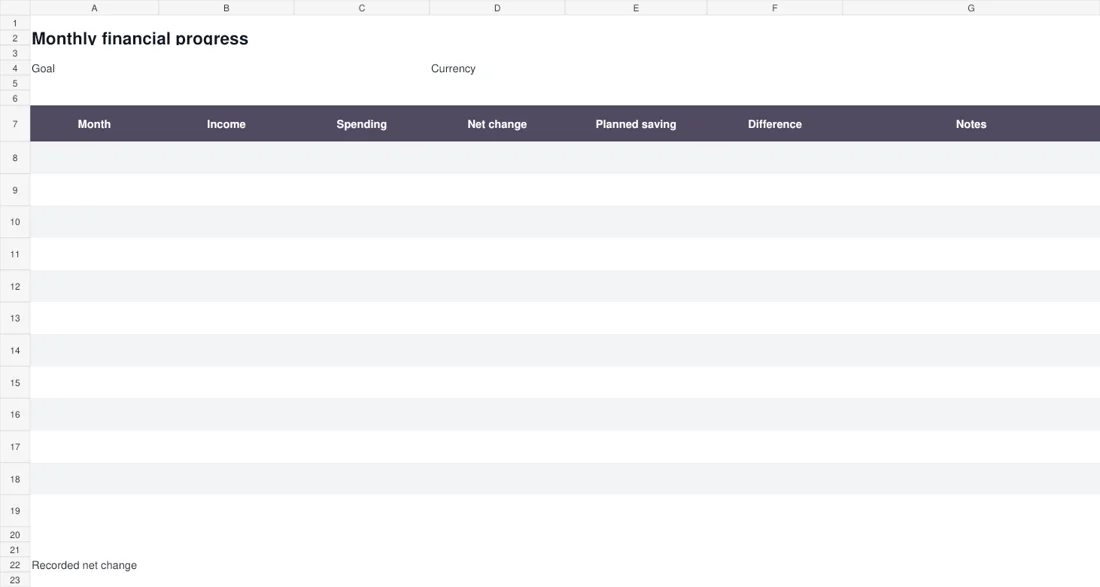
This collection contains two editable Excel downloads. The savings goal tracker follows money added to and withdrawn from one goal. The monthly financial progress tracker compares income, spending and a planned saving amount across twelve entries. Both start with blank inputs, so you can choose your own currency, dates and meaningful targets.
Use the preview to pick a layout before downloading. The workbooks are practical records for personal review; they do not connect to bank accounts, estimate investment returns or decide what you can afford. Their value comes from consistent entries and a review routine that you can actually maintain.
2 downloadable templates and previews
These two downloads are editable files, with previews rendered from the actual documents. Choose the layout that fits your task, then use its download button to save the Word document or Excel workbook.
Keep a blank original and create a working copy before entering your own information. The preview shows the starting layout; longer text, additional rows and your local print settings may change how the edited file appears.
Check the finished document on screen and in print preview before sharing it. The two choices support different ways of organizing the topic, so you can use one independently or combine them where that is useful.
Savings goal tracker
Monthly financial progress tracker
Download Monthly financial progress tracker
Start with a goal you can describe clearly
Give the goal a name that means something to you, such as replacing a laptop, building a moving fund or setting aside a reserve for irregular expenses. Then enter a target amount and, if useful, a target date.
A number without a purpose is easy to ignore; a purpose without a number is difficult to measure. You do not need to set every financial priority at once. One well-kept savings tracker can reveal more than several abandoned spreadsheets.
Choose an amount based on your circumstances and review it when those circumstances change. If your income varies, treat the date as a planning reference rather than a promise that every month will look alike.
Record the reason for a revised target so that a later comparison remains understandable.
How the savings goal workbook calculates progress
Enter the amount already set aside in Opening savings, including zero if you are starting from nothing. Add later contributions in the Added column and money taken out in Withdrawn. The Current amount combines the opening balance with those movements.
Remaining to target shows the gap to a positive target, with a minimum of zero. Progress divides the current amount by that target. The percentage can exceed 100 percent when savings rise above the goal; it is a measure, not a warning.
Formula results stay blank until their required inputs are present. Avoid typing into the calculated cells. Keep contributions and withdrawals as positive entries in their own columns, otherwise a negative withdrawal would reverse the intended calculation.
What the monthly sheet measures
The monthly financial progress spreadsheet takes a different view. Enter the month, recorded income, spending and planned saving. Net change subtracts spending from income, while Difference compares that net change with the planned amount.
A negative difference means the recorded net change is below the plan; it does not explain why. Use Notes to capture the cause, such as an annual payment or delayed income. Income and spending must both contain numbers before the net change appears.
Enter an actual zero when the figure is genuinely zero; leave an unknown figure blank. The total adds the completed monthly net figures. It does not represent your bank balance, net worth or an amount transferred into a separate savings account.
An example: tracking a replacement laptop fund
Suppose a person starts with 100 saved toward a target of 1,000. During the next review period, they add 150 and withdraw 20 for an expense they decide to record against the same fund.
The savings goal tracker shows 230 currently saved, 770 remaining and 23 percent progress. These figures follow the entered movements; they do not assume any interest or future contribution.
In the monthly sheet, income of 1,000 and spending of 650 produce a net change of 350. If planned saving was 250, the difference is 100. Those monthly figures do not prove that 350 reached the laptop fund.
Only the actual transfer recorded in the goal sheet establishes that movement. Keeping the two views separate helps explain why a healthy monthly surplus and a smaller dedicated balance can both be accurate.
At the next review, the person can check what happened to the unallocated surplus before setting another contribution.
Choose a consistent boundary for your numbers
Decide which money belongs in the record before the first entry. For example, you might follow one personal account or a household spending plan. Switching between those boundaries can make a perfectly accurate entry misleading in comparison with the previous month.
If you move money between your own accounts, consider how you will avoid counting that internal transfer as new income. Keep the same treatment in later reviews. The goal workbook and monthly workbook serve different purposes, so do not assume their totals will always match.
A monthly surplus may stay in a current account, while a savings contribution may come from money received earlier. Write a short note explaining your approach rather than trying to force unrelated measures into the same result.
Build a review habit that survives busy weeks
Pick a short review interval and put it somewhere you already look, such as a weekly calendar reminder. Update the record from statements or reliable transaction records instead of trying to reconstruct several months from memory.
During the review, check missing entries, unusual amounts and withdrawals that need a description. Then choose one useful next action. That might be checking a recurring charge, moving an agreed contribution or revising a date. Avoid judging the whole plan from one difficult week.
A tracker is most helpful when it makes changes visible early enough to respond. If the routine feels heavy, reduce the number of things you record before abandoning the review entirely. Keep the source documents separately for any figures you may need to check.
Customize the file without losing the calculations
Save a blank master before entering personal figures, then create a working copy with a recognizable name. Update the currency label to suit your record; the number format itself is neutral rather than a currency conversion tool.
You can adjust column widths and notes to make longer descriptions readable. If you need more transaction rows, work in a copy and extend both the visible table and the formula ranges deliberately.
A row added below the current calculation range will not automatically become part of every total. Test the modified copy with a small known example before relying on it.
When sharing a screenshot, crop out names, account details and private notes that the recipient does not need to see.
Read the trend before changing the plan
A useful progress review asks what the figures mean in context. A larger balance may reflect a one-off contribution rather than a sustainable increase in monthly saving. A flat month might be entirely reasonable if a planned expense occurred. Keep those explanations beside the numbers.
Compare like periods and avoid treating an incomplete month as if it were finished.
If you change the target, record the old amount and why it changed; otherwise a jump in the progress percentage can look like new saving when it is simply a smaller denominator. The spreadsheet can organize evidence, but it cannot supply missing context.
Use the record to prepare better questions about your own priorities and the next practical step.
Keep the record useful when a month goes off course
Unexpected costs are a good reason to add context, not to erase the month. Preserve what actually happened, then adjust a future contribution or target date in a clearly marked review. If a figure is missing, leave it blank until you can check it.
Entering a guessed zero can make the sheet look complete while overstating the information you have. For a shared household plan, agree who updates the working copy and when. Two copies edited separately can create a false disagreement about progress.
Use a dated backup before major changes and choose one file as the current record. A simple explanation beside an unusual entry usually does more for a future review than another color or chart.
A final check before using the template
- Choose one goal and define the accounts or money included.
- Enter a genuine zero where appropriate; leave unknown amounts blank.
- Record additions and withdrawals in their correct columns.
- Check that formula cells still contain formulas.
- Compare completed periods and explain unusual movements.
- Save a private working copy and a dated backup.
Related templates
For business sales records rather than personal saving, explore sales report templates.
Keep billing records separate with invoice templates.
When tracking physical business stock, use inventory templates.
Further guidance
The CFPB Your Money, Your Goals toolkit provides additional worksheets for setting goals and organizing money records.
Frequently asked questions
Are these financial progress trackers editable in Excel?
Yes. Both downloads are XLSX workbooks with editable inputs and formulas. Keep a blank original, enter your own figures in a working copy and avoid overwriting the calculated result cells.
Why does a calculated result stay blank?
The required input may be missing. The goal sheet needs opening savings, including an entered zero, and a positive target for percentage progress. The monthly sheet needs numeric income and spending for each completed row.
Can I use a different currency?
Yes. Enter the currency label you use and keep all amounts in that workbook consistent. The files do not convert currencies, so do not combine unconverted amounts from different currencies in one total.
Does net change equal my savings account balance?
No. Net change is recorded income minus recorded spending for that row. A savings account balance also depends on its opening balance and actual account movements, which the monthly comparison does not automatically import.
You can also browse more options in the Templates category.
