
A maintenance record should help the next person understand what happened to a particular asset. These equipment maintenance log templates provide two editable Excel layouts: a service-history record and a planner for upcoming work. Each download has a matching preview.
Use the history workbook for completed work and supporting references. Use the planner to organize due dates, tasks, owners and follow-up actions. They serve different points in the workflow, so a planned task should not be mistaken for evidence that a service was completed.
Set maintenance requirements from the equipment’s approved instructions and the organization’s responsible process. The workbooks organize records; they do not diagnose a fault or establish that equipment is safe to return to use.
A planned service and its later history entry
Imagine a fictional asset identified as EQ-014. Its planner row records a scheduled task, the date established by the responsible team and the person coordinating the work.
When a required part is unavailable, the status remains unfinished and the next action explains who will obtain the part. After the work is completed and documented, the service-history workbook receives a factual entry with the work-order reference, date and relevant summary.
The planner can then reflect the completed position. If another finding remains open, it receives an appropriate follow-up rather than disappearing inside the completion note. This example shows why the two layouts have different purposes.
One coordinates future work; the other helps explain what actually happened to the identified equipment.
| Field | What it helps establish |
|---|---|
| Asset ID | Which unit the entry concerns. |
| Work order | Where the supporting work record can be found. |
| Next action | What remains to be done and who coordinates it. |
Give every record a stable asset identity
Use a reference that reliably identifies the equipment, such as the organization’s asset tag, and keep it consistent across the work order and log. A general description like “printer” may be ambiguous when several similar units exist.
Record the equipment and location in the relevant header or row. If an asset moves, preserve enough context to understand earlier entries. Avoid changing its reference casually because a department name changes.
A stable identity makes the service history useful during handovers, recurring reviews and questions about which unit received a particular piece of work.
Use the service history for work that actually happened
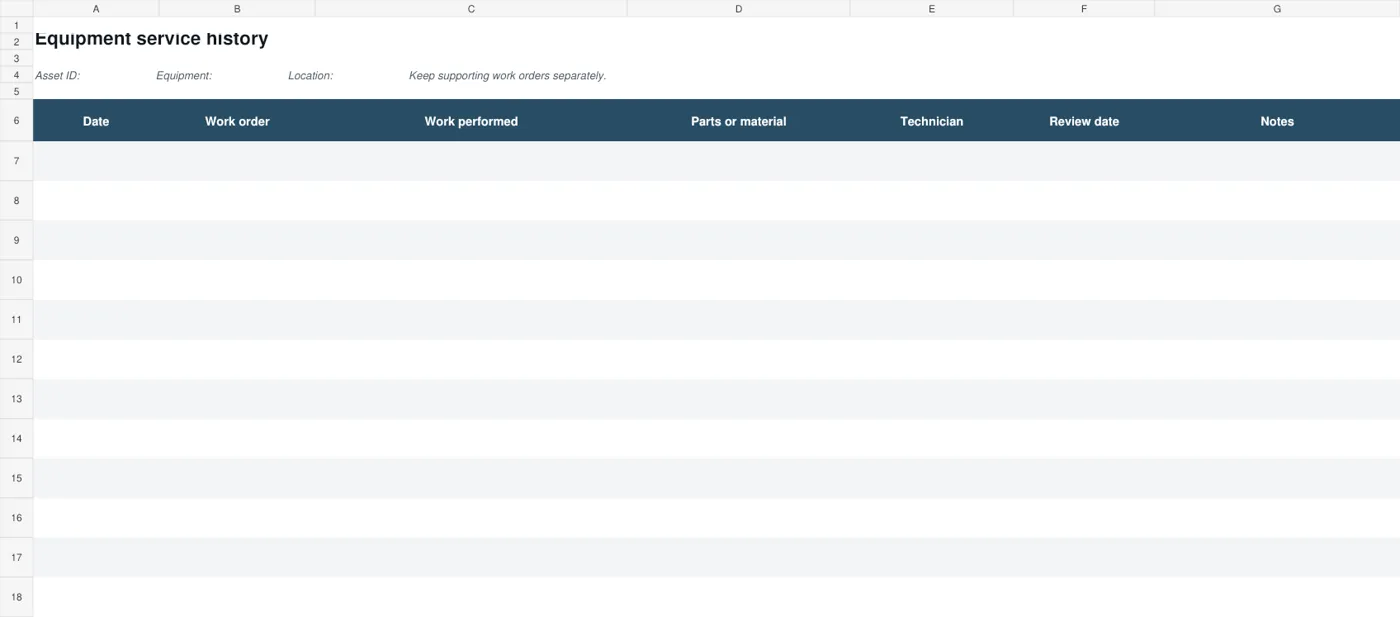
The service-history layout provides columns for the date, work-order reference, work performed, parts or materials, technician, review date and notes. Keep descriptions factual and specific enough to connect the entry with its supporting record.
Distinguish an observed issue from a confirmed diagnosis and a completed action. Do not write that a repair was finished merely because a request was sent.
Where detailed work information belongs in another system, use a dependable reference rather than copying an incomplete account into the spreadsheet. The log should help an authorized person locate the evidence without pretending to contain every technical detail.
Use the planner to organize the next work
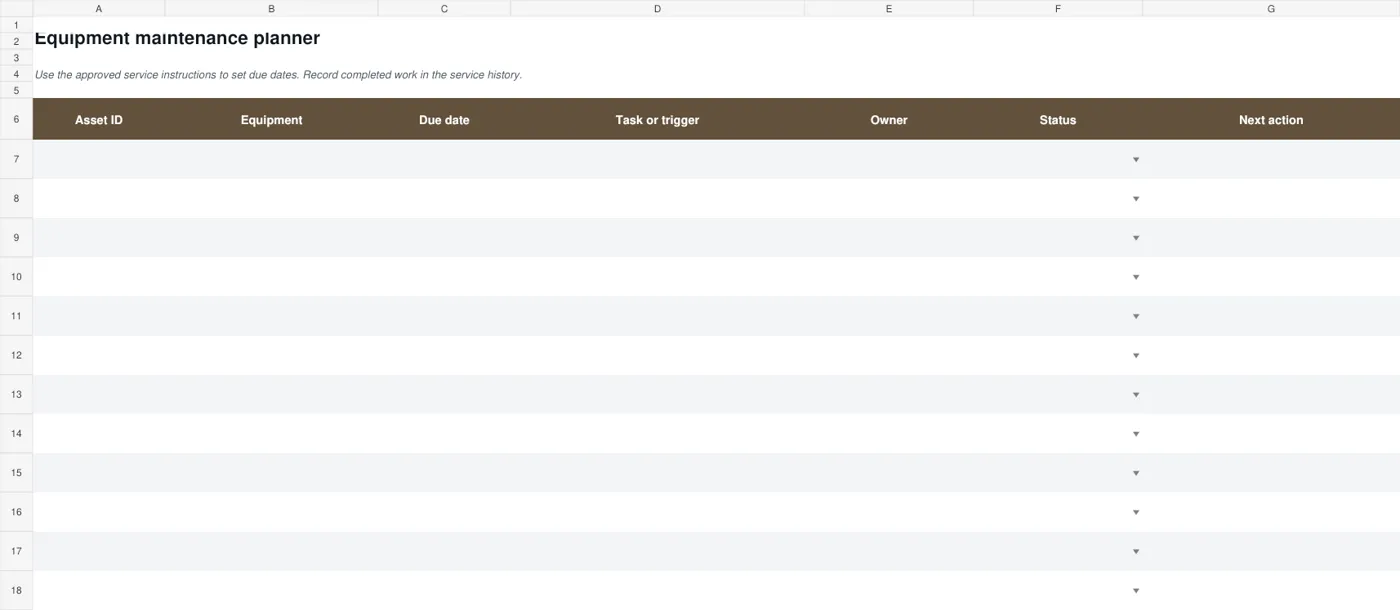
The maintenance planner records the asset, equipment description, due date, task or trigger, owner, status and next action. Set the due date from the relevant instructions and responsible planning process, not from an arbitrary interval left in a sample.
The status choices are Planned, In progress, Complete and Needs review. A row should move forward when its actual position changes. If a task depends on access, parts or a qualified person, record the practical next action.
The planner helps coordinate work; it should not be treated as a completed service record before the work and relevant documentation exist.
2 downloadable templates and previews
The service-history workbook records dates, work orders, work performed, parts or materials, technician references, review dates and notes. The maintenance planner lists assets, due dates, tasks, owners, status and next actions. Both are editable XLSX files with direct downloads and previews of the actual layouts.
Equipment service history
Download Equipment service history
Equipment maintenance planner
Download Equipment maintenance planner
Keep work orders and supporting evidence connected
Use references that let an authorized reviewer find the underlying work order, inspection result or service document. Check the reference when entering it rather than relying on a filename remembered later. If several records concern the same task, make their relationship clear.
A log entry can summarize what was done while the detailed evidence remains in the appropriate system. Keep photographs or other supporting material through the organization’s process and avoid scattering the only copies across personal devices.
The aim is a traceable history that remains understandable when another colleague takes over the asset.
Make parts and technician references useful
When recording parts or materials, use the identifiers and descriptions that match the supporting service record. A vague entry such as “new part” is difficult to interpret later.
Where quantities or units matter, preserve their meaning and keep detailed purchasing information in the appropriate record rather than creating an unsupported cost total in the log. Identify the technician or service provider according to the organization’s process.
This helps an authorized reviewer connect the summary with the work order and ask a specific question if an entry needs clarification.
Record exceptions without disguising the current position
When work is delayed or a finding needs further attention, describe the issue and the next action clearly. Do not mark a row complete simply to remove it from an overdue view.
A planner’s administrative status is not, by itself, an authorization to return equipment to service. Keep any operational restrictions and decisions in the responsible process, with an appropriate reference where needed.
A short precise note helps the next reviewer distinguish a task awaiting a part, a task awaiting documentation and a task that has actually been completed. Avoid a vague “all good” entry that hides the relevant evidence.
Review patterns without jumping to a diagnosis
A service history may show repeated work on the same asset or similar notes over several periods. Bring that pattern to the responsible person with the supporting references.
Do not use a spreadsheet pattern alone to prescribe a repair or decide that equipment should be replaced. The useful contribution is organizing the dates, work and outstanding questions so the qualified reviewer can assess them.
Check whether apparent repeats are separate events or duplicated entries. A clear record can support planning and investigation without turning the log into a technical diagnosis tool.
Maintain the workbook as a working record
Keep a clean master and use clear filenames or storage references for live asset records. Review who can update the history and who maintains the planner. Test added rows, date formats and status fields after changing the structure.
Dates should remain understandable and sortable, and long descriptions should be readable. Before a handover, check that open tasks have owners and next actions and that completed work has its supporting references.
Archive superseded copies through the organization’s process so a colleague can identify the current view instead of guessing between several similar files.
A final check before using the template
- Use a stable asset reference.
- Separate planned work from completed history.
- Record factual descriptions and supporting references.
- Set dates through the responsible maintenance process.
- Keep unresolved findings and next actions visible.
- Check the live workbook before a handover.
Prepare the record for a colleague who was not there
Read a completed example entry as someone who did not attend the service visit. Can they identify the asset, the work, the date, the responsible reference and any unresolved matter? Replace unexplained abbreviations and private shorthand with a brief clear description.
Keep a technical conclusion attributed to its source rather than presenting a guess as a finding. Check that document locations are accessible to the authorized people who need them.
This small review makes the log useful beyond the person who entered the row, which is especially valuable when responsibilities change or a similar issue reappears later.
Related templates
For the separate terms of an external maintenance service, compare maintenance agreement templates.
Keep the underlying equipment list and identifiers organized with inventory templates.
When maintenance coordination changes hands, explain open work with handover report templates.
Frequently asked questions
Are both maintenance downloads editable?
Yes. They are XLSX workbooks with different purposes: service history and upcoming maintenance planning. The previews show the actual files. Keep a blank master and enter live records through your organization’s process.
Does the planner calculate service dates automatically?
No automatic maintenance interval is imposed. Enter dates established by the equipment instructions and responsible planning process. The workbook helps record and coordinate those decisions rather than deciding which technical schedule applies.
Can one history workbook cover several assets?
Use an approach that keeps every entry reliably connected to the correct asset. The supplied history layout has an asset header; the planner includes an asset column. Adapt the structure carefully if combining records so asset identity is never ambiguous.
What belongs in the work-performed column?
Use a factual summary connected to the supporting work order or service record. Distinguish an observation, a diagnosis and a completed action. Avoid implying that an unverified repair or check has been completed.
Does a Complete status mean equipment is safe to use?
The spreadsheet status alone does not establish that. Follow the responsible operational and technical process for return-to-use decisions, and keep the relevant records traceable. Use the planner status to describe the administrative task accurately.
You can also browse more options in the Templates category.
