
Death Certificate Layout References. Death certificate layout references can help readers recognize the kinds of information organized in a vital-record document. They are not official certificates and cannot be completed at home to create an official record. For an actual certificate or certified copy, use the relevant issuing authority's process.
Treat the examples as educational references for document organization. An official record can involve personal details, event information, registration information, and certifications completed by authorized parties. The required form and the responsible issuer depend on the place and purpose.
Browse the previews and resource links, or use the guide below to choose the right layout.
Details to check before choosing a layout
Personal identification. A layout may reserve space for identifying details. Use fictional placeholders in educational material and keep real personal information private.
Event information. Examples may show date and place fields. Do not invent or infer missing information for a real official process.
Registration details. References and registration fields connect an issued record with the authority's records. A template cannot supply an authentic registration.
Certification. Official authentication belongs to the authorized issuer. Do not reproduce seals, signatures, or credentials to make a reference appear official.
A practical preparation workflow
- Identify whether you need an educational example or an actual issued record.
- For an actual record, locate the responsible authority and follow its application process.
- For teaching, use fictional data and clearly mark the page as a sample.
- Store sensitive records securely and share only what the legitimate process requires.
An example in practice
A training diagram can label areas as Personal details, Event details, Registration reference, and Issuer certification. Mark it SAMPLE and omit real identifiers, seals, and signatures. This explains structure without suggesting that the example is an official or certified record.
Which format fits the task?
A reference image, an application for a certified copy, and an issued certificate are different documents. Match the document to the actual need before collecting information.
Keep examples separate from genuine records
Use fictional placeholders when testing the page and remove private information from public examples. A reference image is useful for discussing structure, but its appearance does not establish that it is editable, accepted by a recipient, or authorized for issue. Keep any genuine records in the appropriate controlled process.
Check whether the recipient provides its own form before adapting a general layout. Where professional assessment, verification, or official issue is involved, the responsible person or authority must complete that part of the process. Do not leave demonstration names, numbers, credentials, or signatures in a working document.
Checks that prevent confusion
Do not describe a downloaded layout as a replacement for a certified copy. Avoid using a public template for administrative submissions unless the receiving authority itself provides and accepts that form.
Related documents for the next step
Funeral program templates support a separate memorial-publication task. See free funeral program templates microsoft word.
Album layouts can help organize permitted family photographs for a memorial collection. See wedding album templates.
A magazine-style layout may be useful for a longer remembrance publication. See microsoft word magazine templates.
Previews and linked resources
The collection includes file links and external source pages. File type is shown on direct-file buttons; external pages may offer paid options or additional steps. Some reference images have no editable file attached.


Download two customizable templates
These original downloads are hosted on Templates Front. Each ZIP contains the template files and instructions described below.
Vital record field map
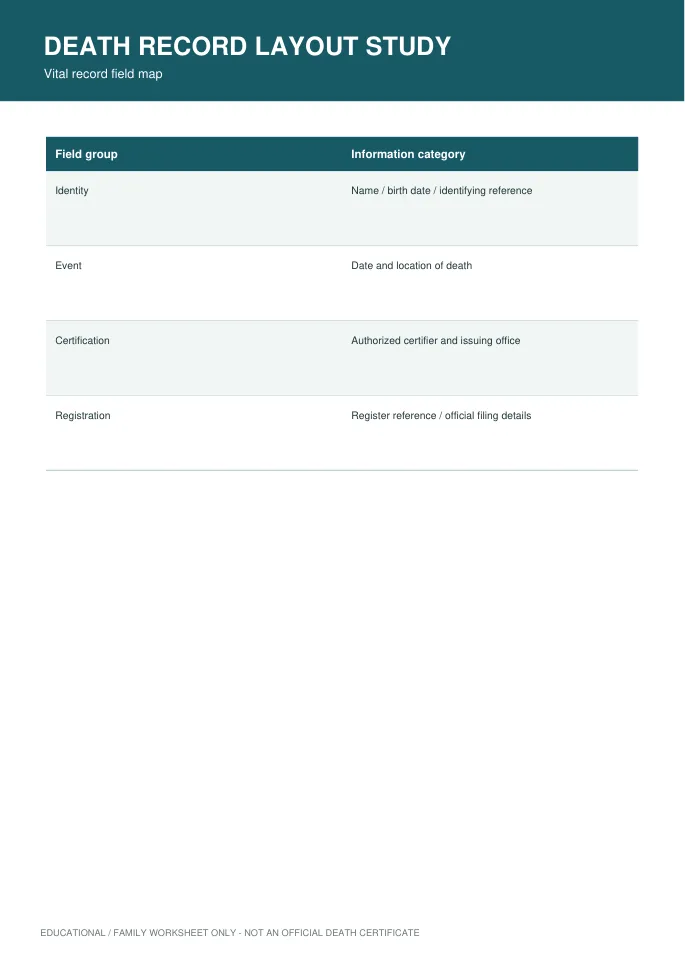
Printable PDF and editable HTML document. Open the HTML in a browser, click the text to edit, then print or save. Tables do not calculate automatically. Educational layout or request worksheet only; this does not create an official certificate.
Family records request worksheet
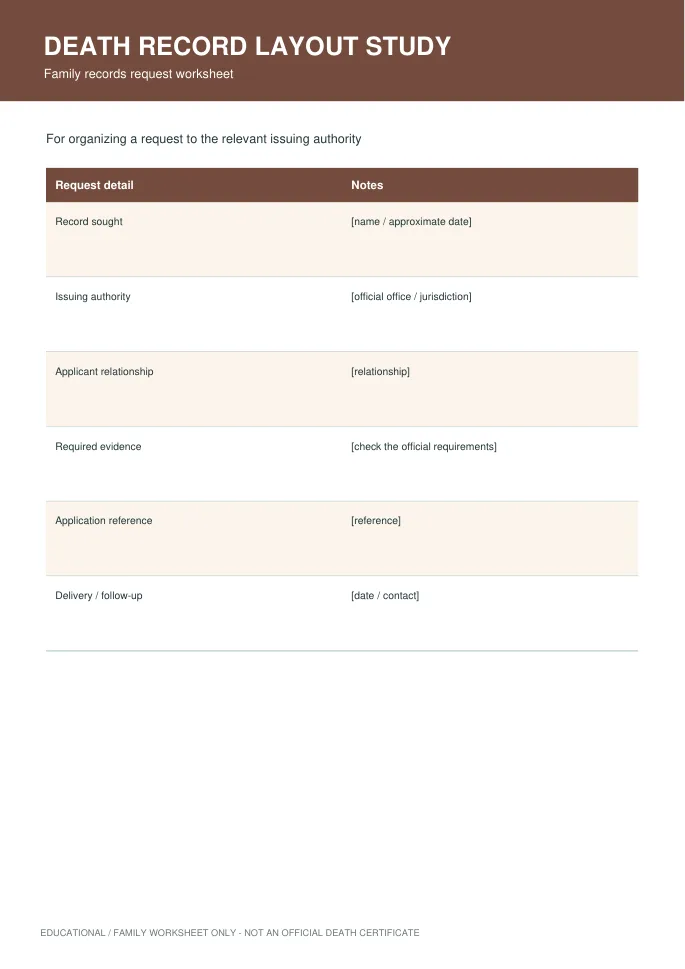
Printable PDF and editable HTML document. Open the HTML in a browser, click the text to edit, then print or save. Tables do not calculate automatically. Educational layout or request worksheet only; this does not create an official certificate.
Frequently asked questions
Can I make an official death certificate from a template?
No. An official record must come through the responsible authority and its authorized process.
Are the examples certified copies?
No. They are layout references, not issued or certified records.
What if I need a copy for administration?
Contact the responsible issuing authority or the organization requesting the record for the appropriate process.
How do I tell a downloadable file from a source page?
The buttons distinguish file links from external source pages. A source page may contain a download, a paid listing, or further information. Check its file type, availability, and usage terms before relying on it. A preview by itself does not promise an editable file.
How to use these death certificate template
Using a ready-made layout layout saves time and helps you avoid missing important details. Follow these simple steps to understand which fields a death certificate normally includes.
- Preview the options above and pick the layout that suits your needs.
- Download the file in the format you prefer.
- Replace the sample details with your own information.
- Check every field carefully before you share or print it.
- Save a copy so you can reuse the layout next time.
Tips for customising your layout
A few small changes make a template feel like your own. Therefore, review each section before you finish.
Treat the layout as reference only
These layouts are examples. An official certificate must come from the authorised civil registry.
Know the typical fields
Common fields include the name, date, place and registration number. Local rules decide the exact list.
Handle personal data with care
Never share real personal details online. Use fictional information when practising or designing.
For related resources, see our funeral program templates and medical certificate templates. You can also browse more options in the Samples category.
Common mistakes to avoid with death certificate template
Even a good template can cause problems if it is used carelessly. Watch out for these common issues.
- Leaving sample text or placeholder names in the final file.
- Skipping a final proofread before you send or print it.
- Using an outdated version instead of the latest copy.
- Forgetting to back up the edited file in a safe place.
Frequently Asked Questions
Are these death certificate template free to use?
Yes, you can download and adapt them for personal or business use. However, always check the source link for any extra terms. If you plan to share the file widely, review those terms first.
Which file format should I choose?
Choose the format that matches the software you already use. Word and PDF files are easy to open on most devices. In addition, editable files let you change details without redesigning the page.
Can I edit the layout after downloading?
Yes, editable versions can be changed in a few minutes. Simply open the file and replace the sample text. Then save it under a new name so the original stays unchanged.
How do I make sure the layout fits my situation?
Start by listing the details you must include. Next, compare them with the sections in the template. Finally, add or remove fields until it matches your needs.
Final thoughts
Good preparation makes any document easier to finish. Take a few minutes to review the details, and your layout will look clear and professional.
